Event Technology for Audience Engagement: Ways to Connect
More interaction doesn’t automatically mean stronger engagement. Event technology to improve audience engagement works best when it helps people contribute, connect and respond, while giving organisers a clearer view of what held their attention. The measure is not how many tools are in the room, but whether they support the event’s purpose.
It’s natural to want an event to feel lively and inclusive, whether people are in the venue, joining online or moving between both. Event technology can support that experience, but it works best when planned around the audience and the moments when participation matters.
This article covers practical ways to encourage participation at live, virtual and hybrid events, from polls and Q&A to shared screens and livestream interaction. It also explains how to assess participation and feedback, so you can see what resonated and use those insights to shape future events.
Table of Contents
1. Event Technology for Audience Engagement: Why Does It Matter?
Engagement means more than attendance: it means people contribute to the event. Event technology to improve audience engagement can support that contribution before, during and after a session. For example, registration questions can reveal which topics attendees want to discuss, helping organisers shape sessions around their interests.
Look for professional platforms that work across in-person, hybrid and virtual events. Useful features include live polls, moderated Q&A, event apps, session information and notifications. Choose tools that suit the event objective and are straightforward for attendees to use, rather than adding features simply because they are available.
For hybrid events, bring in-person and virtual comments and poll results together so speakers can respond to both audiences in real time. A social media wall can display attendees’ posts using an event hashtag, giving people in the venue and online a shared talking point. Announcements and personalised notifications can also highlight schedule changes or relevant sessions.
AI can personalise recommendations using details such as an attendee’s industry, interests or selected sessions. It might suggest a related talk or help connect people with similar professional interests. Use these prompts to support discovery, not to replace conversations between attendees or organisers’ judgement.
Professional teams choose and set up technology by matching each feature to an event goal, then testing the full attendee journey before the event. For a poll, that means checking how responses appear to the audience and how a speaker can use them. Testing also helps teams identify risks such as confusing access, poor integration or personal information being handled carelessly. Choose a New Zealand provider with experience coordinating the event’s format, venue and production requirements.
In New Zealand, plan for accessible interfaces and responsible handling of attendee information. Use clear instructions, offer more than one way to participate where practical, and limit collected data to what the event needs. Tool pricing depends on features, audience scale and production requirements, with the cost provided after a quote request. These choices help keep engagement useful, inclusive and manageable.
2. Engagement in virtual and hybrid events
Virtual and hybrid events need more than a livestream link. Remote attendees need clear ways to join sessions, ask questions and connect with speakers. A moderator can gather online questions while an in-room host manages the discussion, helping both audiences follow the same conversation. Live polling gives each group a direct way to respond.
For a virtual programme, combine scheduled presentations with chat, networking and interactive content. A speaker might introduce a topic, invite questions through chat, then use a breakout discussion so attendees can exchange views. Hybrid event production needs to carry sound and visuals clearly between the venue and online platform, so remote participants can follow what is happening in the room.
Virtual exhibitor booths let attendees explore products without walking a physical floor. Exhibitors can share videos, documents and service information, answer questions through private messages, or arrange meetings with interested attendees. A QR code at an in-person stand can link visitors to the same digital material. Tracking booth visits, resource views and meeting requests gives organisers useful engagement measures.
Augmented reality (AR) overlays digital information onto a physical setting. At an exhibition, attendees might scan a display to reveal product details or an animation. Virtual reality (VR) can offer an immersive product demonstration, virtual tour or training simulation. These experiences work best when they serve a clear purpose and fit naturally into the event schedule.
Professional teams plan how each digital interaction connects to the programme, then test access, audio, visuals and moderation before the event starts. For hybrid production, hybrid and livestream event support can help connect the venue experience with online participation. Clear transitions between presentations, demonstrations and audience interaction keep the format coherent, while post-session feedback helps organisers assess which opportunities attendees used.
3. Live polling and real-time feedback
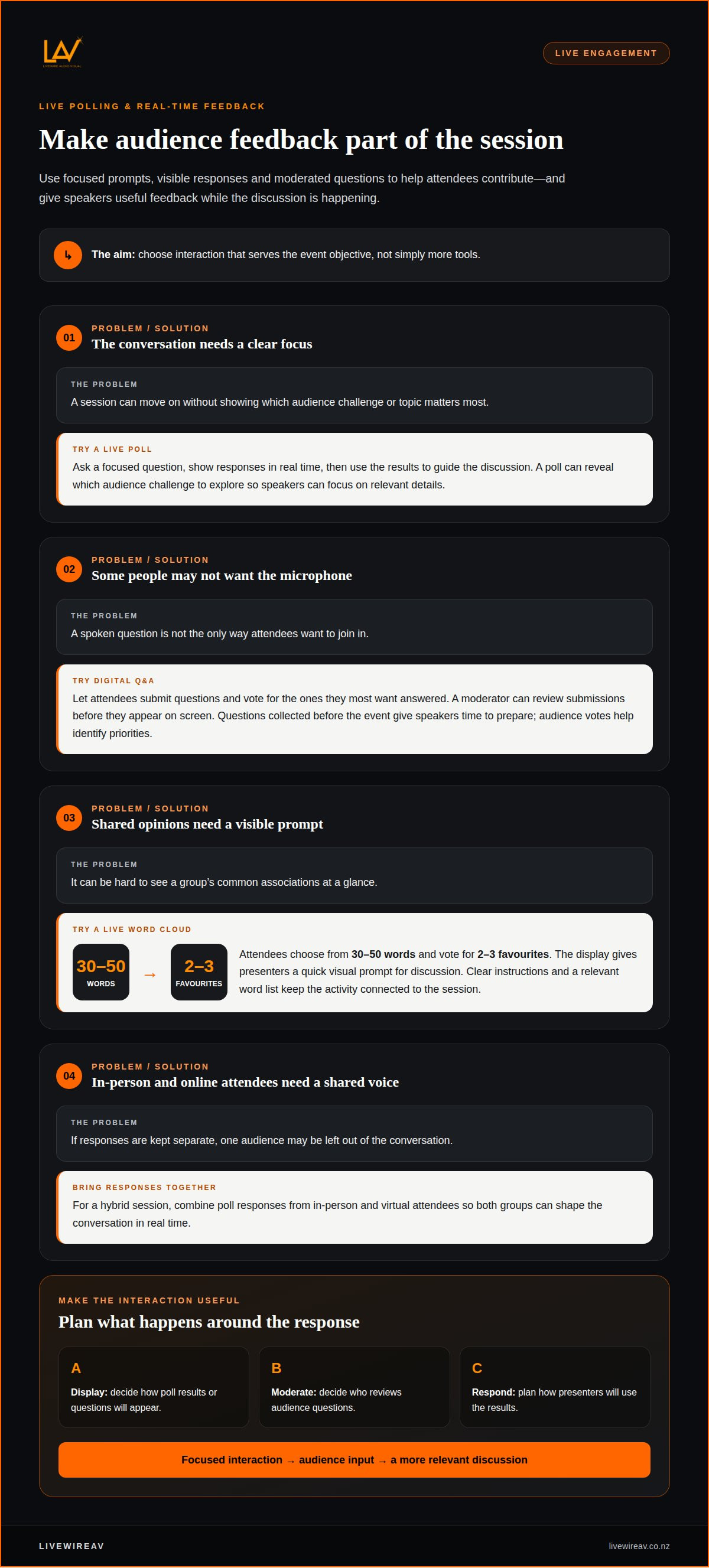
Live polling gives attendees a simple way to respond during a session. A presenter can ask a focused question, display responses in real time and use the results to guide the discussion. For example, a poll can reveal which audience challenge to explore, helping speakers focus on relevant details. In a hybrid session, combine responses from in-person and virtual attendees so both groups shape the conversation.
Digital Q&A offers another way to participate. Attendees can submit questions, vote for the ones they most want answered, and let moderators review submissions before they appear on screen. Collecting questions before the event gives speakers time to prepare, while audience votes help identify priorities. This format can encourage participation from people who may not want to speak into a microphone.
A live word cloud makes shared views visible. For a practical activity, attendees can choose from 30-50 words and vote for 2-3 favourites. The resulting display gives presenters a quick visual prompt for discussion, such as the qualities people associate with a new initiative. Clear instructions and a relevant word list keep the activity connected to the session rather than becoming a distraction.
Live polling and Q&A can also support networking by revealing shared interests for later discussion. A speaker might use a poll to identify a common challenge, then invite attendees to discuss it in small groups. Quizzes, points or leaderboards can add a participatory element when they fit the event objective. Plan how results will appear, who will moderate questions and how presenters will respond. For hybrid production, test the audience interface and on-screen display so interaction is clear for both groups. After the session, poll results and open-text feedback can show not only what attendees chose, but why an activity resonated.
4. Event participation and technology engagement metrics
Useful metrics show whether attendees took part in ways that supported the event’s purpose. Define what engagement means for the programme before choosing platform reports. A corporate conference might focus on session attendance and questions, while an exhibition may prioritise booth interactions, meetings and content views. Counting every click equally can obscure which activities mattered.
During the event, track participation at relevant touchpoints. A mobile platform may report poll responses, chat activity, session attendance and resource views. At an exhibition, compare QR code scans with exhibitor enquiries or scheduled meetings. These measures show whether attendees moved from viewing digital content to taking a meaningful next step.
Put each metric in context. Compare poll responses with the number of people in the session rather than relying on the raw total alone. For virtual sessions, review chat, reactions and breakout-room activity alongside time spent using interactive features. Comparing repeat events over time can reveal changes in participation patterns.
Feedback helps explain the figures. Send a short survey after a session and ask what attendees found useful or wanted more of. Open-text responses can reveal why a presentation or activity worked, while a platform dashboard may group common themes. Segment results by audience type, region or job title when that helps identify different needs. Use the findings to tailor follow-up resources, such as sending relevant material to people who asked questions.
Set the measurement plan before the event: connect each objective to a metric, data source and follow-up action. Then review participation and feedback together, not as isolated totals. This gives organisers a clearer basis for improving the next programme. For a hybrid event where audience data and live production need to work together, plan your hybrid event production with a team that can coordinate the delivery.
LivewireAV: Hybrid & Livestream Events
LivewireAV provides Hybrid & Livestream Events for organisers who want in-person and remote attendees to share a coordinated experience. Its Full Technical Production brings audio, vision and lighting together to support clear communication between presenters, the venue and online participants.
For a conference, exhibition or corporate gathering, LED Walls & Projection can present session content and audience responses in the room, while Audio Line Array Systems support sound delivery for on-site attendees. A joined-up production plan helps each component serve the programme without competing for attention.
Bring the event format, programme and engagement goals into the planning conversation. LivewireAV can shape technical production around your event’s requirements. Contact LivewireAV to discuss your hybrid or livestream event.
Turn audience insight into your next event plan
Treat engagement as a planning input, not just a post-event score. Decide what you want attendees to do, then shape the programme and production around that outcome. This keeps event technology to improve audience engagement tied to a clear purpose, whether the priority is participation, connection or useful feedback.
For a joined-up event, bring LivewireAV’s Full Technical Production, Hybrid & Livestream Events, and LED Walls & Projection into the planning conversation. These services can support a coherent experience for people in the venue and joining remotely, with the event’s objectives guiding the technical decisions.
Share your event format, audience and engagement goals to start mapping out the right production approach. Contact LivewireAV to plan your event, and take the next step towards a clear, well-coordinated experience.
Frequently Asked Questions
Event Technology for Audience Engagement: Why Does It Matter?
Technology can make participation easier to plan and deliver across event formats. Registration responses, for example, can reveal a topic attendees want addressed, helping organisers shape the programme. A well-planned experience gives people clear opportunities to contribute without letting digital features overshadow the speakers or the event’s purpose.
How do event apps, live polls, and Q&A tools increase participation?
These tools give attendees practical ways to participate without relying only on speaking from the floor. An event app can keep the agenda and session updates accessible, while a poll lets a presenter invite a quick response. Digital Q&A lets attendees submit questions discreetly, helping speakers hear from people who might otherwise remain silent.
How can organisers measure audience engagement and event technology ROI?
Define the event’s intended outcome, then assess technology investment against actions that support it. For a product launch, those actions might include requests for product information or follow-up meetings, rather than screen views alone. Combine platform activity with post-event feedback and relevant business outcomes. This offers a more useful assessment than counting interactions without considering their purpose.
What are the best audience engagement platforms for in-person, hybrid, and virtual events?
Choose an event platform that supports the format and purpose, with easy-to-use features such as live polling, moderated Q&A, event apps, session information and notifications. For hybrid events, make sure it can bring in-person and online participation together.
How do event engagement tools compare in features and pricing?
Features may include live polls, moderated Q&A, event apps, session information and notifications. Pricing depends on the features, audience scale and production requirements, with the cost provided after a quote request.
Comments