Outdoor LED Screen Rental for Festivals and Concerts
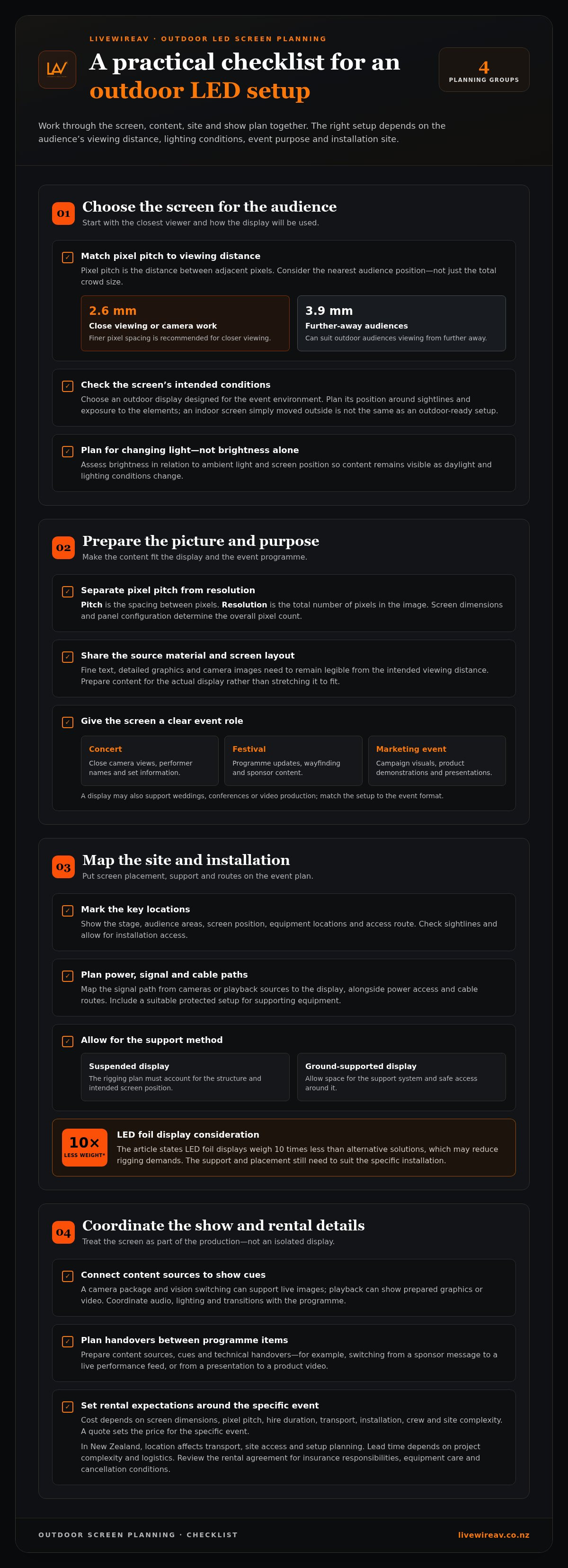
Weather-resistant LED screens are used for festivals and concerts when the display is designed for outdoor conditions and suited to the event site. Outdoor LED screen rental involves more than choosing a screen that can handle the weather: placement, brightness and installation planning all affect how well it works.
It’s reasonable to expect clear images and reliable operation as weather and lighting conditions change. The right setup depends on the screen’s location, the audience’s viewing distance and whether cameras need to capture the display.
This guide explains which outdoor screen options suit live events, how brightness affects visibility and what a rental may include. It also covers pixel pitch: 2.6 mm is suited to close viewing or camera work, while 3.9 mm can suit audiences viewing from further away. With those factors in view, you can plan a display that fits the site and the experience you want to create.
Table of Contents
LED displays for festivals, concerts and marketing events
Festivals, concerts and marketing events use LED displays for more than stage backdrops. A main-stage screen can show live camera shots, performer names and sponsor graphics. Side screens can repeat key visuals for people outside the central viewing area. At a food festival, a display might show schedules or direct attendees to activity zones. Give the screen a clear purpose, then plan its content and position around it.
Outdoor LED screens are designed for outdoor use, but the event layout still matters. During site planning, identify the screen’s position, audience sightlines and exposure to the elements. Consider installation access and routes for signal and power connections, and plan a suitable protected setup for supporting equipment. These decisions help the display fit the site, rather than treating it as an indoor screen simply moved outside.
For outdoor LED screen rental, match the display setup to the event programme and audience. Examples include:
Concert stages: Show close camera views, performer names and scheduled set information.
Festivals: Share programme updates, wayfinding and sponsor content across separate viewing areas.
Marketing events: Present campaign visuals, product demonstrations and branded presentations.
Each use calls for different content and placement. A concert may prioritise camera feeds, while a public festival may need clear information between performances.
Event production connects the screen with its content sources and show cues. A camera package and vision switching can support live images, while playback can show prepared graphics or video. Audio and lighting also shape the overall stage experience. For example, a product launch may combine presenter slides, a live camera view and planned lighting changes. Coordinating these elements helps keep transitions organised.
Installation planning starts with the venue or site plan. Mark the stage, audience areas, screen position and equipment locations. Then map the signal path from cameras or playback sources to the display, alongside the power and cable routes. At a concert, this can help keep crew movement and audience access in view. LED foil displays weigh 10 times less than alternative solutions, which may reduce rigging demands. The screen’s placement and support still need to suit the particular installation.
Event support includes preparing content sources, coordinating cues and managing technical handovers between programme items. At a festival, that might mean switching from a sponsor message to a live performance feed. At a marketing event, it could mean moving from a presentation to a product video. Clear cueing, suitable equipment and a considered installation plan make the display part of the production, not an isolated screen.
What Does My LED Screen Rental Come With?
A rental plan should suit the display, viewing conditions and site. Pixel pitch, resolution, power access and event logistics all help determine what the screen setup needs to cover.
Pixel Pitch and Viewing Distance
Pixel pitch is the distance between adjacent pixels, measured in millimetres. It affects how close viewers can stand before individual pixels become noticeable. Choose it by considering the nearest audience position, not only the total crowd size. For close viewing, 2.6 mm pixel pitch is recommended; for outdoor audiences farther away, 3.9 mm can suit the viewing distance.
For example, a screen beside a presentation area needs finer pixel spacing than a large display viewed from across an event site. Map the front row and likely viewing zones before selecting panels. This helps balance image detail with the distance from which people will watch.
Screen Resolution and Pixel Pitch
Pixel pitch and resolution are related, but they describe different things. Pitch is the spacing between pixels; resolution is the total number of pixels in the image. Screen dimensions and panel configuration determine the overall pixel count, so the same content can look different on screens of different sizes.
Consider the source material as well as the display. Fine text, detailed graphics and camera images need a configuration that keeps them legible from the intended viewing distance. Share the content format and screen layout during planning, so the image can be prepared for the actual display instead of stretched to fit.
Power, Rigging and Site Requirements
Outdoor screen hire requires a suitable position, stable support and a planned power supply. The site layout should show the screen location, access route, equipment position and cable paths. Power, rigging and site requirements depend on the screen configuration and installation method, and should shape the setup plan.
For a suspended display, the rigging plan must account for the structure and intended screen position. For a ground-supported installation, allow space for the support system and safe access around it. Include these details in the event site plan alongside nearby stages, audience areas and production equipment.
Booking, Insurance and Cancellation Terms
Across New Zealand, location affects transport, site access and setup planning. Book once the event date, venue and screen position are established, leaving time to coordinate the display with the production schedule. The lead time depends on the project’s complexity and logistics.
The cost depends on screen dimensions, pixel pitch, hire duration, transport, installation, crew and site complexity. A quote sets the price for the specific event. Review the rental agreement for insurance responsibilities, equipment care, cancellation conditions and weather-related arrangements. These terms clarify how changes to the event or site may affect the hire.
A detailed event production plan can align the screen setup with venue access, content and show cues.
Screen rentals for video production, weddings and conferences
A video production, wedding and conference each need a screen plan shaped around the programme. A camera shoot may prioritise accurate image display, while a wedding may focus on speeches and shared photos. A conference could use presentation slides, speaker close-ups and remote contributions. Decide what the audience needs to see before choosing screen placement, content sources and production equipment.
For video production, camera framing and screen position need to work together. A display visible behind a presenter can show graphics or playback, but its brightness and position may affect camera exposure. Rent For Event recommends 2.6 mm pixel pitch when image quality on camera matters. Share camera positions, shot framing and intended screen content during planning, so the display can be considered alongside the production layout.
CAD pre-visualisation turns a venue plan into a practical view of the proposed setup. A drawing can mark the stage, screen, cameras, audience sightlines and equipment positions. For a wedding reception, it can show how a screen fits beside the stage without blocking the couple or guests. For a conference, it can help map presenter sightlines and camera angles. Review the plan against the venue layout before installation.
Recording and livestreaming add another layer. A camera feed may go to the room’s screen, a recording system or an online audience. These destinations need clear routing and coordinated cues. For example, a conference may show a speaker on screen while a remote presenter joins the programme. Confirm which feeds will be displayed, recorded or streamed, and how transitions fit the running order.
Media servers and vision switching manage playback and changes between sources. A media server can organise prepared graphics and video files; a vision switcher can move between cameras, slides and remote feeds. At a wedding, the sequence might include a photo montage, a live speech and a camera close-up. At a product presentation, a playback clip may lead into a live demonstration. A cue list helps operators follow the programme.
Audio and screen components should support the same event plan. Match speech reinforcement to the room or outdoor setting, and consider lighting cues that keep presenters visible. A production scope may include:
Camera feeds, vision switching and recording for live coverage.
Prepared presentation content, playback and media-server operation.
Audio support for speeches, panel discussions or presentations.
Lighting cues coordinated with screen content and stage activity.
For a hybrid conference, plan the room experience and livestream together. This keeps the in-person presentation and remote viewing aligned.
Outdoor screen visibility and brightness
Outdoor visibility depends on screen brightness, ambient light, viewing angle and content. A display facing afternoon sun has different demands from one used after dusk. Assess the screen position alongside the event schedule, and consider how sunlight, shade and stage lighting will change during the programme.
Brightness describes the light produced by a screen, commonly expressed in nits. Higher output can help an image remain visible in bright surroundings, but brightness alone doesn’t guarantee legibility. Reflections, viewing distance, screen angle and image contrast all matter. For example, white text on a pale background can be difficult to read even on a bright display.
Start with the audience’s sightlines. Identify where people will stand, whether the screen faces direct sunlight and what might obstruct the view. A stage screen positioned above performers may serve a different viewing area from a display beside a festival entrance. Check viewing angles from the sides as well as the centre, since LED images can look different from different positions.
Content design also affects readability. Use strong contrast, uncluttered layouts and text large enough for the intended viewing distance. Keep essential details, such as a performance time or sponsor name, brief and well spaced. A dense presentation slide may work on a nearby conference screen but lose clarity on a distant outdoor display.
Plan brightness around the full event timeline. Daylight, cloud cover and evening conditions change what the audience sees. Test representative content at the installation position, including camera feeds and graphics. Review it from different audience areas, then adjust screen settings and content if details are hard to distinguish. Don’t rely on a brightness specification alone to predict the final viewing experience.
Weather-resistant equipment is designed for outdoor conditions, but visibility planning still needs to account for the site. Rain, changing light and wind can affect the event setup and viewing conditions. Consider the screen position, support arrangement and surrounding structures together. A covered stage, for instance, may shade performers while leaving the audience in bright daylight.
Council permits and resource consent are separate considerations for a temporary screen in New Zealand. Relevant requirements depend on location, installation structure, display purpose and applicable local planning controls.
Before installation, use this practical review:
Map the screen position against sunlight, shade and audience sightlines.
Check sample graphics, text and camera images from viewing areas.
Review brightness and contrast as daylight changes during the event.
Include the screen structure and intended use in site planning.
These steps connect brightness choices to real viewing conditions, rather than treating screen output as a standalone specification.
Outdoor, indoor, mobile and giant LED wall rental options
Choose a screen format by considering the venue, audience positions and programme. LED walls and projectors suit different settings, so compare image conditions and installation requirements before deciding.
For outdoor LED screen rental versus a projector or indoor display hire, consider ambient light, weather exposure and viewing distance. An outdoor LED display is designed for outdoor use, while projector visibility depends on conditions around the projected image.
Outdoor, Indoor and Mobile Screen Options
Outdoor screens suit open-air events where audiences need a direct view of stage content, event information or live camera images. Indoor displays fit venues such as conference rooms, exhibition halls and reception spaces, where room layout and ambient light shape the setup. Match the screen type to the environment, not simply the event label.
For a mobile event setup, consider how the display will be transported, positioned and connected at each site. A touring activation, for example, may need a screen plan that accommodates different venue layouts. Before choosing, map the audience area, screen position, content sources and available installation space. These practical details help determine which format fits.
Giant LED Wall Rental
A giant LED wall can create a broad visual surface for a festival stage, concert or large brand presentation. Its scale can support live camera images and graphics across a wide audience area, but makes placement and content planning essential. Assess stage proportions, sightlines and viewing positions before setting the wall’s dimensions.
Large displays need content designed for the full screen layout. A logo or title that reads clearly on a small monitor may look misplaced when enlarged. Plan screen content, camera framing and transitions together, then coordinate the display with the stage design. The installation plan should also account for access, support and equipment positions.
Projectors can suit presentations in controlled indoor spaces, especially when the venue layout provides a clear projection surface. LED displays may be more suitable where ambient light or a large audience makes projected content harder to see. An indoor display is another option for venues that need a self-emitting screen. The right choice depends on the room, content and viewing conditions.
Use this checklist to narrow the options:
Venue: Identify whether the event is indoors, outdoors or moving between sites.
Audience: Mark sightlines, viewing distances and areas where people will gather.
Content: Decide whether the screen will show slides, video, branding or camera feeds.
Installation: Consider access, support and equipment placement at the venue.
For a festival stage or large presentation, plan your LED wall setup around the venue, content and audience sightlines.
LivewireAV: Full Technical Production
LivewireAV can integrate the screen into a wider event production plan. Its Full Technical Production and LED Walls & Projection offerings connect display requirements with other technical elements of the event. For a concert, that may mean planning screen content alongside stage audio; for a conference, Hybrid & Livestream Events can support a programme for both in-person and remote audiences.
Turn to LivewireAV when you need coordinated production, not just a screen considered in isolation. Share the event format, venue, audience layout and intended content so the technical plan can cover the full setup.
To discuss your event production, contact LivewireAV.
Set the screen plan in motion
Give the display a defined role in the event rather than treating it as a backdrop. Decide what you want attendees to notice, understand or do at key moments. That purpose can guide the content sequence, production cues and the screen’s contribution to the wider programme.
For outdoor LED screen rental, prepare a short creative brief as a useful next step. Note the event’s main objective, the moments that need visual support and any content already being produced. Include the audience experience you want to create, from arrival through to the final cue. This gives the planning conversation a clear starting point and connects the display to the event, not just the stage.
LivewireAV can help shape that planning into a coherent technical approach for your event. Start planning your event screen with LivewireAV and take the next step with a clear purpose for the display.
Frequently Asked Questions
Do you have weather-resistant LED walls?
Yes, weather-resistant LED wall options are available for outdoor event productions. The screen’s placement and supporting setup still need to suit the site conditions. For an exposed stage, include the display position and surrounding structures in the production plan. This makes outdoor visuals part of the show while accounting for how the screen will be installed and used.
How Does a LED Wall Work?
An LED wall forms images from light-emitting diodes arranged across connected display panels. Playback or video equipment sends content through processing equipment, which maps the image across the wall. For example, a live camera feed can be switched to the display during a performance. The panels work together as one viewing surface, while the production system controls which visual appears.
What Is Pixel Pitch?
Pixel pitch describes the spacing between pixels on an LED display. It affects how finely details appear, especially thin lines, small lettering and close-up images. A graphic that looks clear from the back of a venue may lose detail when viewed nearby. Check sample content from the intended viewing position, particularly if your design includes small text or fine visual elements.
Why rent LED screens?
Renting an LED screen gives an event access to a display setup suited to its venue and programme, without requiring the organiser to own and store the equipment. It can also be planned alongside cameras, playback, audio and lighting. For instance, a one-off awards evening may need a screen for presentations and live camera views, while a touring event has different site requirements.
What content formats and resolutions do rental LED screens support?
Supported formats and resolutions depend on the playback and screen configuration. Before the event, prepare the content specifications, intended screen layout and source details for the production team. A presentation deck, pre-produced video and live camera feed, for example, may each need different handling. Planning these sources together helps keep aspect ratio, image framing and transitions consistent on screen.
How far in advance should I book an outdoor LED screen rental?
Book once the event date, venue and screen position are established, leaving time to coordinate the display with the production schedule. Lead time depends on the project’s complexity and logistics.
Comments